















777 Casino login and verification (KYC): account and password
Logging in to 777 Casino opens your personal account with the main and bonus balances, the cashier, request history and the verification section. You can log in with the e-mail address or phone number you used to create the account, or through a social network if you registered with one; the same details work both in the browser and in the Android and iOS apps.
Below you will find a step-by-step guide, password recovery, contact confirmation, verification (KYC) through Diia or documents, and common login errors with solutions. The casino operates under PlayCity license No. 306-R of 10.08.2026, so only verified players aged 21 and over are allowed to play for money. A general overview of the brand is on the 777 Casino in Ukraine page.
| Parameter | How it works |
|---|---|
| Login | e-mail, phone or social network |
| Password recovery | “Forgot password?” → e-mail or phone |
| Phone confirmation | 4-digit code by SMS |
| Verification (KYC) | Diia or photos of documents |
| When KYC is required | before you start playing for money |
| Changing phone or e-mail | only via live chat |
Contents
- How to log in to 777 Casino
- The 777UA personal account
- Recovering and changing your password
- Confirming your phone and e-mail
- Verification (KYC) at 777 Casino
- Confirming your card after login
- Casino 777 login not working: causes and solutions
- How to protect your 777 Casino account
- Logging in from a smartphone: browser and the 777UA app
- Frequently asked questions
777ua.co.ua is an information website: we do not accept bets or payments and do not organize gambling. The site contains affiliate links to online casinos. Age 21+.
How to log in to 777 Casino
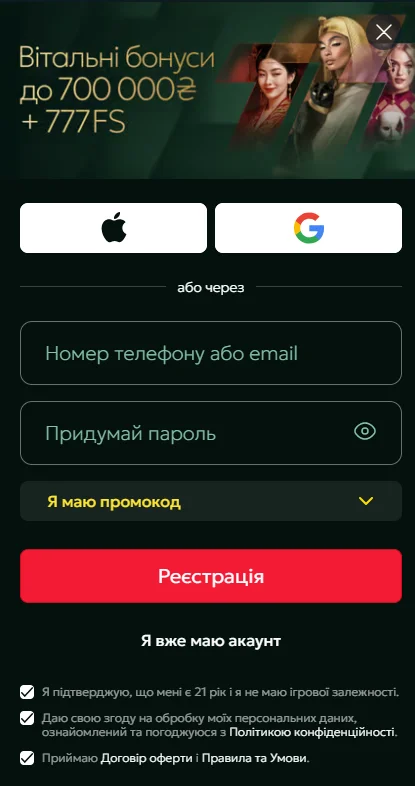
Your login is the contact you provided during registration: an e-mail address or phone number.
- Click “Log in”.
- Enter your e-mail or phone number.
- Enter your password and confirm the login.
- If you created the account through a social network, click its icon below the form and follow the prompts.
If none of the methods lets you into the account, do not create a new one: the public offer agreement allows only one account per player, and a duplicate will be blocked together with its payouts. It is better to write to the live chat straight away.
The 777UA personal account
The personal account opens from the menu, and the settings from the gear icon next to the account ID. Everything related to money and security is gathered here, so every action starts from the account: from a deposit to a payout request.
- Balance — main and bonus shown separately; winnings from bonus Fortune Spins go to the bonus balance first.
- Cashier — “Deposit” and “Withdraw” tabs, request history.
- Bonuses — active offers and the wagering progress bar.
- Verification — KYC status, document upload and card confirmation.
- Settings — password and contacts; self-limitation is on a separate page in the “Help” section.
Example: a player tops up 400 ₴ and takes the 125% first deposit bonus — 500 ₴. The bar in the “Bonuses” tab will show progress towards 500 × 35 = 17,500 ₴ in bets, and the main balance will stay empty until the wagering is completed. To avoid losing the bonus, no withdrawal request is submitted before that point: it automatically cancels the wagering.
Recovering and changing your password
If you have lost your Casino 777 password, click “Log in” and choose “Forgot password?”. Enter the e-mail or phone linked to the account, click “Recover password” and follow the instructions in the e-mail or SMS.
You can change your current password at 777 Casino from the personal account: gear icon next to the account ID → “Password” tab → enter the new password twice. Use a combination you do not use on other sites, so that a hacked third-party service will not open access to your balance.
Confirming your phone and e-mail
Confirmed contacts are needed to restore access to your 777 Casino account and receive codes. In the settings, enter your number or e-mail in the corresponding field and click “Confirm”: a 4-digit code will arrive by SMS on your phone, and an e-mail with a link in your inbox.
If the e-mail has not arrived, check the “Spam”, “Social” and “Promotions” folders. You cannot change a number or address you have already provided on your own: the support live chat does this after verifying the account owner.
Verification (KYC) at 777 Casino
Under the license conditions only verified players aged 21 and over are allowed to play, so the initial identity check takes place before the first real-money bet. Later the operator may ask you to update your documents — this is required by financial monitoring legislation.
Through Diia
- In the verification methods window, choose Diia.
- Sign in with Diia.Signature; if you do not have one, the app will show you how to create it.
- Approve the transfer of copies of your digital documents.
- Enter the 5-digit Diia.Signature code and click “Send via Diia”.
Once the documents have been transferred, the status changes automatically. If you have forgotten your Diia.Signature code, the app has an “I don't remember the code” option that lets you change it.
By uploading documents
For an ID card, photos of both sides are required. For a booklet passport — the first page spread with the series and number fully visible, as well as the pages with photos pasted in at ages 25 and 45, if they have already been added. The image must be sharp, without glare or cropped edges.
Confirming your card after login
You can withdraw money from 777UA only to a card issued in your name and by the same method you used to top up the account. That is why the operator asks you to confirm the card with a screenshot that shows both its number and the owner's full name.
| Bank | Where to get the screenshot |
|---|---|
| PrivatBank | Privat24 → gear icon → “Card details” |
| monobank | “Send card statement” for any period |
| Other bank | card details section in online banking |
The finished screenshot is uploaded to the profile, in the “Verification” section. Without it, the request will not go into turbo withdrawal but through the regular queue of up to 24 hours.
Casino 777 login not working: causes and solutions
Most login problems at 777 Casino are related to the browser or device settings rather than the account. Before writing to support, go through the table.
| Situation | What to do |
|---|---|
| The site opens, but login fails | log in using “Incognito” mode |
| Wrong password | “Forgot password?” → code to e-mail or phone |
| SMS does not arrive | check the number, write to the chat |
| The game does not start after login | update the browser, clear the cache and cookies |
| Games are not displayed | turn off VPN |
If login is blocked by the account itself — for example, because of self-limitation or a security check — only the operator's support can find out the reason and the duration.
Example: a self-exclusion application to the PlayCity Register is filed through Diia for a period of 6 months to 3 years. Anyone who restricted themselves for 6 months on 01.11.2026 will not be able to play at any legal casino until 01.05.2027, and 777UA is no exception.
How to protect your 777 Casino account
Access to your balance rests on three things: a unique password, a confirmed phone and e-mail, and a verified card. If any of these is not set up, restoring the account after a hack will be harder, and payouts will be delayed for the duration of the check.
- SMS codes and links from e-mails are meant only for you — do not forward them to anyone.
- Log in from your own devices; on someone else's computer, click “Log out” after playing.
- Before entering your password, check the address in the browser bar and the https padlock icon.
- Do not install APKs from forums and file-sharing services — only from the official website.
- If you notice an unfamiliar transaction, change your password and write to the live chat immediately.
Limits deserve separate attention: to keep play within your budget, set deposit limits before your first top-up. Control tools and help contacts are collected on the responsible gambling page.
Logging in from a smartphone: browser and the 777UA app
The mobile version of the website opens in Chrome or Safari without installation and adapts to the screen. The login and password are the same as on a computer.
For frequent play, the 777UA app is more convenient: the Android APK is downloaded from the operator's website and the iOS version from the App Store. The app sends push notifications about promotions, and the cashier and verification work in it the same way as on the website.
What is available right after login — the catalog, sections and demo mode — is described on the 777 Casino slot machines page.
Frequently asked questions
How do I log in to 777 Casino if I registered through Google?
Click “Log in”, choose the Google icon and follow the prompts. If this method does not work, write to the live chat.
Can I change my phone number myself?
No. The number and e-mail in a 777UA account can only be changed by the live chat after verifying the owner's identity.
How long does verification through Diia take?
The procedure takes as long as it takes to sign in with Diia.Signature and approve the document transfer; once the copies have been transferred, the status updates automatically.
Why can't I withdraw money after logging in?
At 777 Casino you can withdraw funds only after verifying your identity and card. A withdrawal request is also blocked by an active bonus with unfinished wagering — submitting a request will cancel it.
What should I do if the site loads but login fails?
Try logging in using “Incognito” mode — this way the browser does not pick up old cookies. If that does not help, clear the cache or open the app.
The rules for using the website are on the terms page, and help contacts for gambling addiction are in the responsible gambling section.